
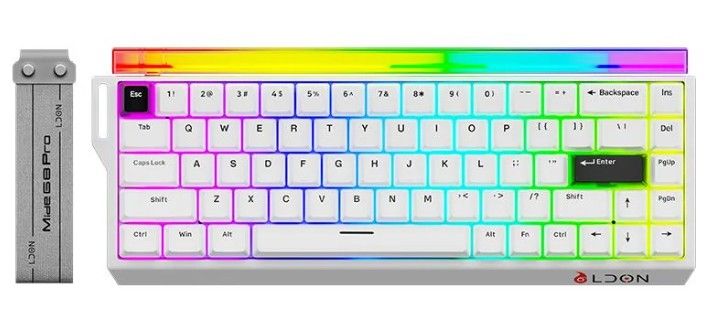
Ldon 68pro Gaming Mechanical Keyboard

მიწოდება მთელი საქართველოს მაშტაბით უფასო
თბილისში ქეშით ან გადმორიცხვით,რეგიონებში გადმორიცხვით.
1. Introduction
The LDON Mide 68 Pro is a high-performance E-sports magnetic switch gaming keyboard designed for competitive gaming. It features an 8000Hz polling rate, ultra-low latency, and highly precise magnetic switches with adjustable trigger points. The keyboard is built with durable PBT keycaps and a gasket structure for a comfortable and responsive typing experience, complemented by vibrant RGB backlighting.
LDON Mide 68 Pro keyboard with RGB lighting
LDON Mide 68 Pro E-sports magnetic amber switch keyboard with light box.
2. Specifications
Feature Specification
Model Name Mide68 Pro magnetic hinge keyboard
Keyboard Standard 68 keys (Not Full Size)
Advertisements
Ezoic
Connection Method Wired (USB Interface Type)
Operation Style Mechanical
Switches Magnetic Axis (Tianqing PRO Magnetic Amber Shaft), Hot-swappable
Axis Body Accuracy 0.01mm
Trigger Precision 0.01mm micro button operation, adjustable trigger reset area
Full Stroke 3.5 ± 0.1mm
Trigger Pressure 35 ± 5gF
Polling Rate 8000Hz (8K rate of return)
Scan Sampling Rate 128K
Latency 0.125ms event-level ultra-low latency
Keycap Material PBT plastic, two-color injection molding
Backlight Type Multicolor RGB (16 million colors)
Positioning Board Metal positioning plate, transparent PC positioning board
Structure Gasket structure with integrated silicone pad
Advertisements
Ezoic
Programmable Yes (via web driver)
Application Desktop, Laptop
Language English
Weight Approx. 539g ± 20g (excluding wire)
Dimensions 325.3 x 115.1 x 38.2mm
Certification CE
Mide68 Pro Product Parameters table
Detailed product parameters for the Mide 68 Pro keyboard.
3. Package Contents
Your LDON Mide 68 Pro keyboard package should include:
Advertisements
Ezoic
LDON Mide 68 Pro Gaming Keyboard
USB Cable
User Manual (this document)
4. Setup Guide
Connect the Keyboard: Plug the USB cable into the USB port on the LDON Mide 68 Pro keyboard and connect the other end to an available USB port on your computer (Desktop or Laptop).
Automatic Driver Installation: Your operating system should automatically detect and install the necessary drivers for the keyboard.
Web Driver for Customization: For advanced customization, including key remapping and magnetic switch adjustments, access the dedicated web driver. No software installation is required. Refer to the official product page or included documentation for the web driver URL.
Advertisements
Ezoic
Keyboard connected to a monitor showing web driver interface
The keyboard supports web driver adjustment for custom keys without software installation.
5. Operating Instructions
5.1 Basic Keyboard Use
The LDON Mide 68 Pro functions as a standard 68-key keyboard. Simply plug it in and begin typing. The compact layout is designed for efficiency and gaming performance.
5.2 RGB Backlight Control
The keyboard features a 16 million color RGB backlight system with various preset lighting effects and single-key customization options.
Advertisements
Ezoic
Cycle Effects: Use the designated function key combinations (e.g., Fn + key) to cycle through different RGB lighting modes.
Brightness Adjustment: Adjust backlight brightness using specific key combinations.
Speed Adjustment: Modify the speed of dynamic lighting effects.
Color Customization: Utilize the web driver to customize individual key colors or create your own lighting profiles.
Black keyboard with vibrant RGB backlight
The keyboard features standard 16 million color RGB backlight with customization options.
5.3 Magnetic Switch Features
The magnetic switches offer advanced control and precision:
0 Dead Zone: Achieve zero dead zones on both upper and lower levels for quick and uninterrupted responses.
Adjustable Trigger Points: The magnetic switches allow for precise adjustment of the key trigger and reset points (RT adjustment accuracy up to 0.01mm). This enables features like emergency stop, rapid walk, and continuous drum beat in games.
High Polling Rate: The 8000Hz polling rate ensures up to 8 times faster operation information transmission compared to traditional 1KHz keyboards, providing quicker in-game response times.
Advertisements
Ezoic
Close-up of a magnetic switch with 0 dead zone feature
Magnetic switches allow for 0 dead zones and adjustable trigger points for quick responses.
Advertisements
Ezoic
Diagram showing 0.01mm high precision magnetic switch and its components
Detailed view of the Tianqing PRO Magnetic Amber Shaft, highlighting 0.01mm precision and adjustable trigger reset area.
Advertisements
Ezoic
6. Maintenance
Cleaning Keycaps: The PBT keycaps are durable and resistant to shine. Use a soft, damp cloth to wipe them clean. For deeper cleaning, keycaps can be carefully removed (using a keycap puller, not included) and washed with mild soap and water, ensuring they are completely dry before reattaching.
Cleaning the Keyboard Body: Use a soft, dry cloth to wipe the keyboard body. For dust and debris between keys, use compressed air.
Switch Maintenance: The magnetic switches are designed for longevity. Avoid spilling liquids directly onto the switches. If a switch feels inconsistent, ensure no debris is lodged within.
Cable Care: Avoid sharp bends or excessive pulling on the USB cable to prevent damage.
Exploded view of keyboard gasket structure
The gasket structure with PBT keycaps and magnetic amber shaft ensures durability and a pure, comfortable feel.
7. Troubleshooting
Keyboard Not Responding:
Ensure the USB cable is securely connected to both the keyboard and the computer.
Try connecting the keyboard to a different USB port on your computer.
Test the keyboard on another computer to rule out system-specific issues.
RGB Backlight Not Working/Incorrect:
Check if the backlight is turned off or set to minimum brightness using the keyboard's function keys.
Access the web driver to ensure lighting settings are correctly configured.
Advertisements
Ezoic
Keys Registering Incorrectly or Not at All:
Clean around the affected key to remove any debris.
If using the 0 dead zone feature, ensure the dead zone is manually set to approximately 0.1mm to prevent accidental triggers from minor environmental factors (e.g., hand movements, airflow, table shaking). This adjustment can be made via the web driver.
Since switches are hot-swappable, consider carefully removing and re-seating the affected switch.
Web Driver Not Accessible:
Ensure your computer has an active internet connection.
Verify the web driver URL is entered correctly.
Try a different web browser.
Advertisements
Ezoic
8. User Tips
Optimize Magnetic Switch Settings: Experiment with the adjustable trigger points and dead zone settings via the web driver to find the perfect balance for your gaming style. A recommended manual dead zone setting is around 0.1mm to avoid unintended key presses.
Leverage Programmable Keys: Use the web driver to program custom macros or reassign keys for specific games or applications, enhancing your workflow and gaming performance.
Explore RGB Effects: Take advantage of the 16 million color RGB backlighting to personalize your keyboard's appearance. Create unique lighting profiles for different games or moods.
Stable Placement: The keyboard features a thick shell design for stability. Ensure it is placed on a flat, stable surface to prevent movement during intense gaming sessions.


